MCP传输:让JSON消息跨进程交换
正在读取学习记录…
1. 消息沿哪条路走
传输负责把消息从一个程序送到另一个程序。stdio使用标准输入输出管道,适合应用启动本地子进程;Streamable HTTP通过HTTP连接远端服务。
标准输入stdin是程序接收文字的通道,标准输出stdout是程序发送结果的通道,标准错误stderr是诊断日志通道。把它们想成服务窗口的收件口、回件口和内部工作日志:各走各的,接收方才容易解析。
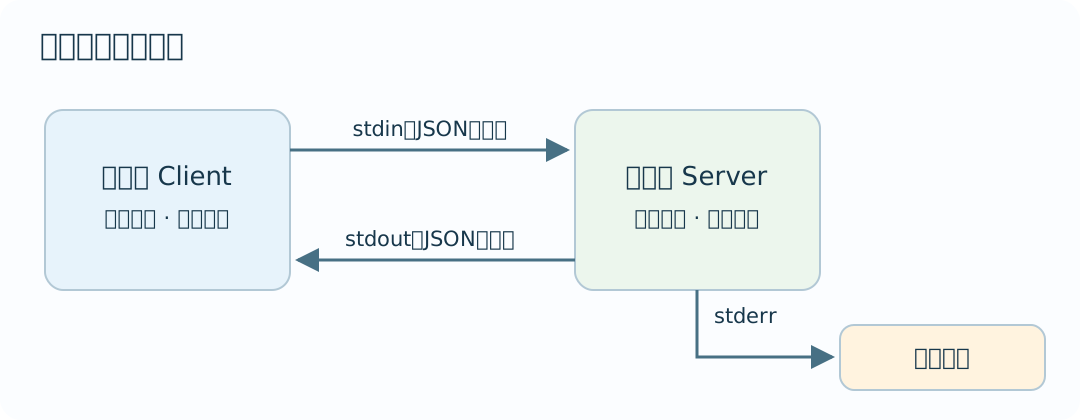
MCP2025-11-25的传输规范规定stdio消息使用UTF-8并以换行分隔。下面实际启动一个子进程,交换初始化和空目录消息。
2. 创建两个程序
同一目录创建stdio_server.py和stdio_client.py。
先在 PowerShell 创建本篇的独立目录并进入;路径可换成你自己的非系统盘位置:
mkdir -Force "F:\学习\agentdepth-l2-mcp-transport"
cd "F:\学习\agentdepth-l2-mcp-transport"
将本篇的 stdio_server.py、stdio_client.py、test_stdio_demo.py 保存到这个目录。保存全部文件后运行 dir *.py,核对上述文件名,再执行下文命令;新开窗口时先回到该目录,并按 Python 环境篇核对 python 的解释器路径。
"""通过标准输入接收消息,分别输出协议响应与诊断日志。"""

import json
import sys


# 依据方法名构造响应,沿用收到的请求编号。
def reply(message):
    request_id = message.get("id")
    method = message.get("method")
    if method == "initialize":
        return {"jsonrpc": "2.0", "id": request_id, "result": {
            "protocolVersion": "2025-11-25", "capabilities": {"tools": {}},
            "serverInfo": {"name": "stdio-demo", "version": "0.1.0"}}}
    if method == "tools/list":
        return {"jsonrpc": "2.0", "id": request_id, "result": {"tools": []}}
    return {"jsonrpc": "2.0", "id": request_id,
            "error": {"code": -32601, "message": "Method not found"}}


def main():
    initialized = False
    ready = False
    for raw in sys.stdin:
        try:
            message = json.loads(raw)
            if not isinstance(message, dict):
                raise ValueError("object_required")
        except (json.JSONDecodeError, ValueError):
            print("invalid_input", file=sys.stderr)
            continue
        method = message.get("method")
        if method == "notifications/initialized":
            if initialized:
                ready = True
                print("initialized_notification", file=sys.stderr)
            else:
                print("notification_before_initialize", file=sys.stderr)
            continue
        if method == "initialize":
            initialized = True
            response = reply(message)
        elif method == "tools/list" and not ready:
            response = {"jsonrpc": "2.0", "id": message.get("id"),
                        "error": {"code": -32000, "message": "Not initialized"}}
        else:
            response = reply(message)
        print(json.dumps(response, ensure_ascii=False), flush=True)
        print("handled_method=" + str(method), file=sys.stderr)


if __name__ == "__main__":
main()"""启动子进程,逐次发送消息,并分别读取响应与日志。"""
import json
import subprocess
import sys
from concurrent.futures import ThreadPoolExecutor
from pathlib import Path
def exchange():
server = Path(__file__).with_name("stdio_server.py")
process = subprocess.Popen([sys.executable, str(server)],
stdin=subprocess.PIPE, stdout=subprocess.PIPE, stderr=subprocess.PIPE,
text=True, encoding="utf-8")
pool = ThreadPoolExecutor(max_workers=1)
def send(message):
# 一行一个JSON消息,flush让服务端及时收到。
process.stdin.write(json.dumps(message, ensure_ascii=False) + "\n")
process.stdin.flush()
def receive(expected_id):
# 在线程中等待一行,调用方最多等待5秒。
line = pool.submit(process.stdout.readline).result(timeout=5)
response = json.loads(line)
if response.get("id") != expected_id or "error" in response:
raise ValueError("响应编号或状态异常")
return response
try:
send({"jsonrpc": "2.0", "id": 1, "method": "initialize", "params": {
"protocolVersion": "2025-11-25", "capabilities": {},
"clientInfo": {"name": "stdio-client-demo", "version": "0.1.0"}}})
initialized = receive(1)
if initialized["result"].get("protocolVersion") != "2025-11-25":
raise ValueError("服务端协议版本与当前客户端不匹配")
# 收到并核对初始化响应后,再发送准备通知和目录请求。
send({"jsonrpc": "2.0", "method": "notifications/initialized"})
send({"jsonrpc": "2.0", "id": 2, "method": "tools/list"})
catalog = receive(2)
process.stdin.close()
if process.wait(timeout=5) != 0:
raise RuntimeError("服务进程退出异常")
return [initialized, catalog], process.stderr.read().splitlines()
finally:
if process.poll() is None:
process.kill()
process.wait(timeout=5)
pool.shutdown(wait=True)
for stream in (process.stdin, process.stdout, process.stderr):
if hasattr(stream, "close"):
stream.close()
if __name__ == "__main__":
result, diagnostics = exchange()
print("response_ids", [item["id"] for item in result])
print("tools", result[-1]["result"]["tools"])
print("stderr_events", diagnostics)python stdio_client.py输出:
response_ids [1, 2]
tools []
stderr_events ['handled_method=initialize', 'initialized_notification', 'handled_method=tools/list']
response_ids是两个响应编号,分别对应初始化和目录请求。准备通知没有编号,因此这里有两条响应。tools为空列表,表示服务声明支持工具但当前目录为空。stderr_events显示处理消息的诊断记录。
客户端用subprocess.Popen启动服务器,send向stdin写入JSON行。先用receive取得初始化响应并核对版本,再发送准备通知和目录请求。每次读取在线程中最多等待5秒,finally负责关闭子进程和通道。stdout和stderr分别读取。服务器逐行解析,每条响应打印后flush,及时交给客户端;日志使用file=sys.stderr。
把服务器一条诊断print中的file=sys.stderr去掉,再运行,客户端解析stdout时会遇到非JSON日志。恢复之后成功。这就是分开通道的实际用途。
4. 选择本地与远端传输
| 传输 | 进程关系 | 配置重点 |
|---|---|---|
| stdio | 应用启动本地子进程 | 可执行路径、参数、环境与日志 |
| Streamable HTTP | 客户端访问服务地址 | 地址、认证、超时、会话与协议版本 |
HTTP客户端通过POST发送消息,服务可返回JSON或SSE事件流;GET可用于建立接收服务消息的流。SSE是一种HTTP上的逐条事件传递方式。不同版本传输规则可能变化,SDK、服务与规范版本需要对应。
本地子进程要有明确退出策略:客户端结束时关闭输入并等待退出,必要时终止进程。示例设置5秒超时;服务无法退出时,客户端可以定位子进程日志。远端连接则要设置连接与读取超时,并处理断线后的会话状态。
总结:方法决定消息内容,传输决定它怎样到达;协议走stdout,诊断走stderr。接着读 工具发现。
5. 验证消息与边界
测试文件保存到同一目录:
下面的测试启动本机子进程,检查初始化、准备完成通知和工具目录查询的消息交换,并核对异常消息与日志出口。这个服务返回空工具目录,工具发现篇继续学习分页收集和筛选目录。
测试代码:test_stdio_demo.py
import unittest
import subprocess
import sys
import json
from pathlib import Path
from unittest.mock import patch
import io

from stdio_client import exchange
from stdio_server import reply


class StdioTests(unittest.TestCase):
    def test_initialize_error_stops_before_notification(self):
        sent = []
        class Input(io.StringIO):
            def write(self, text):
                sent.append(json.loads(text))
                return super().write(text)
        class Fake:
            stdin = Input()
            stdout = io.StringIO(json.dumps({"jsonrpc":"2.0","id":1,
                "error":{"code":-32602,"message":"Unsupported version"}})+"\n")
            stderr = io.StringIO("")
            def wait(self, timeout=None): return 0
            def poll(self): return 0
            def kill(self): pass
        with patch("stdio_client.subprocess.Popen", return_value=Fake()):
            with self.assertRaises(ValueError): exchange()
        self.assertEqual([item["method"] for item in sent], ["initialize"])
    def test_initialized_waits_for_initialize_response(self):
        # 假进程只在读取初始化响应后允许发送准备通知。
        class Input(io.StringIO):
            def write(self, text):
                if "notifications/initialized" in text:
                    self_test.assertTrue(fake.read_initialize)
                return super().write(text)
        class Output:
            def readline(self):
                if not fake.read_initialize:
                    fake.read_initialize = True
                    return json.dumps({"jsonrpc":"2.0","id":1,"result":{
                        "protocolVersion":"2025-11-25","capabilities":{"tools":{}}}})+"\n"
                return json.dumps({"jsonrpc":"2.0","id":2,"result":{"tools":[]}})+"\n"
        class Fake:
            read_initialize = False
            stdin = Input()
            stdout = Output()
            stderr = io.StringIO("")
            def wait(self, timeout=None): return 0
            def poll(self): return 0
            def kill(self): pass
        self_test = self
        fake = Fake()
        with patch("stdio_client.subprocess.Popen", return_value=fake):
            responses, _ = exchange()
        self.assertEqual([row["id"] for row in responses], [1,2])
    def test_subprocess_framing(self):
        responses, stderr = exchange()
        self.assertEqual([item["id"] for item in responses], [1, 2])
        self.assertEqual(responses[-1]["result"]["tools"], [])
        self.assertIn("initialized_notification", stderr)

    def test_diagnostics_do_not_pollute_protocol_stdout(self):
        responses, stderr = exchange()
        self.assertEqual(len(responses), 2)
        self.assertTrue(any(item.startswith("handled_method=") for item in stderr))

    def test_unknown_method_returns_json_rpc_error(self):
        self.assertEqual(reply({"id": 7, "method": "unknown"})["error"]["code"], -32601)

    def test_tools_list_before_initialize_is_rejected(self):
        server = Path(__file__).with_name("stdio_server.py")
        wire = json.dumps({"jsonrpc": "2.0", "id": 2, "method": "tools/list"}) + "\n"
        output = subprocess.run([sys.executable, str(server)], input=wire,
                                capture_output=True, text=True, encoding="utf-8", timeout=5, check=True)
        self.assertEqual(json.loads(output.stdout)["error"]["message"], "Not initialized")


if __name__ == "__main__":
unittest.main()python -m unittest test_stdio_demo -v恢复实验中的改动后运行测试。失败时先查看对应参数、编号或权限条件,再核对程序分支。
课后练习展开习题收起习题
正在读取本地记录…
不调用模型,不执行代码。简答、代码和场景题仅保存答案并展示自查标准,不生成评分、徽章或认证。输入内容不会自动保存,请点击提交;不要填写个人信息或密钥。
选择题 · 先判断边界
关于“MCP Transport 与生命周期”,哪种做法更稳妥?
对应知识点:L2-mcp-transport
简答题 · 解释失败
写出一个失败输入并说明记录字段。
对应知识点:L2-mcp-transport
代码题 · 边界测试
补充正常、边界、失败三组输入和预期结果。
对应知识点:L2-mcp-transport
场景题 · 结果未知
证据不足时如何设计状态和人工接管?
对应知识点:L2-mcp-transport
描述会发送给本站维护者,用于修订文章,保存90天。请只填写文章问题,省略个人信息、密钥和内部资料。